SOS / Notfallnummern

FAQs about the online shop and the MyMountainClub

Questions and answers about the online shop, the club, the Club Card and the points:

The online shop
How do I find the online shop?

You can find our online shop in the menu on our website or directly under the link "www.ok-bergbahnen.com/shop": https://www.ok-bergbahnen.com/shop/. You can also access our shop via the free OK Bergbahnen app. You'll find the corresponding button in the bottom center.

Are there discounts on certain tickets?

Yes. As a MyMountainClub member, you collect valuable points in your club account and can redeem them for discounted tickets. Discounts are available on ski tickets, such as the Oberstdorf Kleinwalsertal season pass, day and multi-day tickets, and even selected pedestrian tickets! The discount is only available online and not at the ticket offices! Simply select your desired ticket online and redeem your collected points during the checkout process.

Where can I enter a discount code?

Tap on the desired ticket in the shop. In the window that opens, you can configure your ticket. This is also where you can enter a discount code (if available).

This box will not appear for products that are not discounted.

I don't have a keycard. How do I get a Club Card?

You'll receive the Club Card blank after your first order at our PickUp machines. Once you have the keycard in your hands, you can turn it into your personal Club Card. Download the OK Bergbahnen app and register for MyMountainClub for free. Enter your 23-digit keycard number in the Club area. Once the Club Card is linked to your profile, you'll receive all the benefits of the Club.

I found a keycard (not a club card). Can I use it in the online shop?

Yes, if it's a Skidata keycard. You can add a valid ticket to this keycard in the webshop. To do so, enter the keycard number (the 23-digit serial number on the back of the card) during the booking process. The ticket (e.g., a day ski pass) will be activated the first time you pass through the turnstile. NOTE: If you are a MyMountainClub member and want to use all the benefits, you will need the Club Card as a data carrier!

I have booked several tickets on my registered ClubCard. How do I activate them?

If you have booked multiple tickets (authorizations) on your ClubCard, they are waiting in the system for you to retrieve them one by one. When you go through the turnstile with your card, one of these authorizations is activated. As long as a valid authorization is active on your ClubCard, the other bookings are in a queue. If you go through the turnstile with your ClubCard without a valid authorization, the next authorization from the queue is activated. This continues until you have no more bookings in the system.

I placed an order and have now received a collection code (QR code). How do I get my ticket?

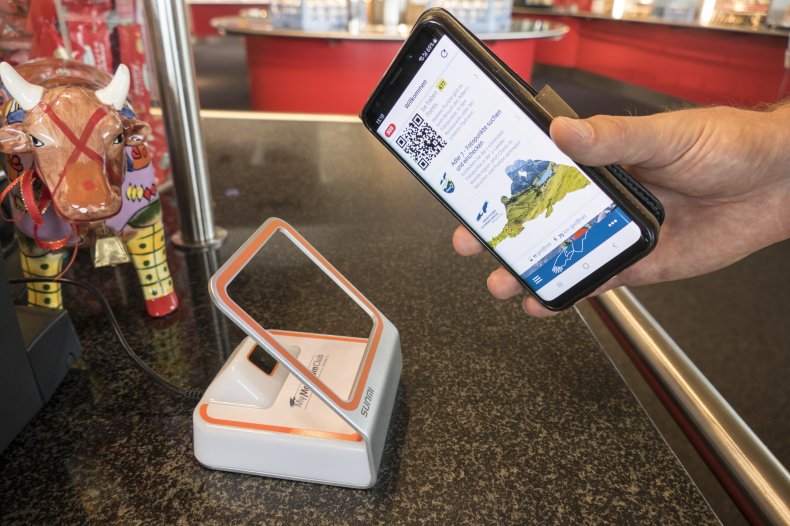
The pick-up code (QR code) is mandatory on site. Please either print it out or carry it with you digitally. We have installed a total of 14 pick-up machines at our base stations in the ski areas. You can recognize them by our logo and the "Pick-Up Machine" label. Scan your QR code on site and you'll receive your ticket.

I ordered several tickets for pickup at the machine, but the QR code is the same for all of them. Why?

If you order multiple tickets for pickup in one order, the system will treat this as a single booking, which will also be collected from the machine simultaneously. This means all tickets ordered in one booking will be produced at once. This is useful for orders for a family.

If you want to book multiple tickets for yourself at once, it's advisable to make multiple bookings. This way, you'll receive a different QR code for each booking.

How can I pay in the online shop?

You can pay either with VISA/Mastercard credit card (Note: Your card must be registered for 3-D Secure. Please register your card via your bank's registration portal), with Apple Pay and Google Pay, or by instant bank transfer (PaybyBank).

The amount was debited from my account, but I haven't received a booking confirmation. What can I do?

First, check your spam folder. The confirmation email may have ended up there. If you haven't received an email, contact us immediately via email at shop@ok-bergbahnen.com or call the shop hotline at +49 (0)8322 96 00 22 10. You can reach us Monday-Thursday from 8:00 a.m. to 5:00 p.m. and on Friday from 8:00 a.m. to 12:00 p.m.

What happens if I entered an incorrect date of birth?

In MyMountainClub, you can change your date of birth under "My Details." If you're having trouble, please contact us immediately by email at shop@ok-bergbahnen.com and provide us with your correct date of birth. We will then enter it into our backend system. Please note that random checks are conducted in the area. In case of misuse, your card will be blocked without replacement or reimbursement.

I'm a student, pupil, or trainee. Do I need to provide proof of confirmation when booking?

As a student, pupil, or trainee, you can get discounted mountain railway tickets in the online shop. The requirement is that you are currently enrolled in the relevant academic year. To apply, upload the corresponding proof of eligibility. The "Proof" field will appear once you have entered your date of birth. Our staff will then verify your proof in the background. Please note that we check all proof of eligibility. In case of misuse, your card will be blocked without replacement or refund.

You can provide proof of eligibility for the discount with the following documents:

- Enrollment certificate from a college/university,

- Student ID card,

- Certificate of school enrollment issued by your school,

- Trainee contract,

- Certificate for a Voluntary Social Year (FSJ).

How can I upload or renew my proof of eligibility for a student/trainee discount?

Log in to the app (or the homepage).
1. Go to Shop and select a product. This will open a window where you can edit your profile under Cardholder (click + pencil icon).
2. Here you can edit your information or upload/update your profile picture and file (.jpeg or .pdf) for the discount. The window for uploading proof of eligibility only appears for people with a year of birth relevant to the student year period.
3. Save, and you're done.
You can now close this window without having to add the product to your shopping cart.

Can I cancel my booked ticket?

Yes. Please contact us immediately by email at shop@ok-bergbahnen.com or call the shop hotline at +49 (0)8322 96 00 22 10. Please note that this is only possible as long as the tickets have not yet been picked up. If you already have a ticket, please contact an employee at the OK Bergbahnen ticket office.

The MyMountainClub
Where can I find the club code?

You can find your club code in the OK Bergbahnen app under "Club". At the very top of the club section, you'll see your MyMountainClub profile. Your personal club code is located below your profile picture. Here you'll also find your personal QR code, which you'll need for collecting and redeeming certain offers.

How can I upload or renew my proof of eligibility for a student/trainee discount?

Log in to the app (or the homepage).
1. Go to Shop and select a product. This will open a window where you can edit your profile under Cardholder (click + pencil icon).
2. Here you can edit your information or upload/update your profile picture and file (.jpeg or .pdf) for the discount. The window for uploading proof of eligibility only appears for people with a year of birth relevant to the student year period.
3. Save, and you're done.
You can now close this window without having to add the product to your shopping cart.

I have booked several tickets on my registered ClubCard. How do I activate them?

If you have booked multiple tickets (authorizations) on your ClubCard, they are waiting in the system for you to retrieve them one by one. When you go through the turnstile with your card, one of these authorizations is activated. As long as a valid authorization is active on your ClubCard, the other bookings are in a queue. If you go through the turnstile with your ClubCard without a valid authorization, the next authorization from the queue is activated. This continues until you have no more bookings in the system.

What is the MyMountainClub (MMC)?

The MMC is a free club for guests and fans of the Oberstdorf Kleinwalsertal Bergbahnen. As a member, you enjoy numerous benefits and discounts, as well as helpful features.

What does MyMountainClub offer?

MMC members enjoy the following benefits, discounts, and features:

  • Discounts on various OK Bergbahnen mountain railway tickets in winter and summer
  • Discounts on mountain railway tickets through points redemption
  • Access to the MMC Points bonus program: Collect points while hiking, skiing, and at our restaurants and partner businesses. These points can then be redeemed for mountain railway tickets, at restaurants, or with our partners.
  • Up-to-date news from the two-country region in the form of newsletters
  • Push notifications about weather, snow conditions, special offers, and news
  • Other features include powder alerts, a flower calendar, Skiline, etc.
How do I become a member of MyMountainClub?

Simply register for free with the club and confirm your membership via email. You can then enjoy many of the benefits of club membership!

How much does membership in the MMC cost?

Membership/registration in MyMountainClub is free!

What benefits do I have as a club member?

There are numerous benefits to being a member:

  • Discounts on mountain railway tickets in winter and summer
  • Time savings – no waiting in line at the ticket office! Conveniently book your mountain railway ticket on your Club Card!
  • Convenience & flexibility – buy tickets from your mobile phone using the OK Bergbahnen app and go skiing or hiking spontaneously
  • With the Club Card, you can park at discounted rates at all our parking lots!
  • With the MyMountainClub Card, you can collect valuable points and redeem them for tickets, in restaurants, or with our partners
How much is the discount on mountain railway or ski tickets?

As a club member, you'll receive attractive discounts on selected summer and winter tickets during our online sales promotions. If you collect MyMountainClub points during your membership, you can redeem them at any time for a discount on your mountain railway ticket! Please note: all tickets are only available at the regular price at the ticket offices.

How do I set up push notifications and what are the benefits?

Push notifications are usually activated when you first open the OK Bergbahnen app. If you subsequently want to make changes to your settings, you can do so via your device's app settings. We'll provide you with all the latest news via push notifications – from current events and the current status of the cable cars or parking lots to the snow alert. You decide which type of notifications you want to enable or disable.

How can I delete my account?

Should you decide to delete your account, you have two options: In the club area under "My Data," you can delete your account yourself, or send an email with your name, email address, and club code to "shop@ok-bergbahnen.com." We will remove your data immediately.

The MyMountainClub Card
What is the MyMountainClub Card?

The MyMountainClub Card is the data storage device (chip card) you receive when you purchase a ski ticket. In winter, you can collect tickets ordered online from our PickUp machines, and in summer, from our ticket offices. The Club Card becomes your personal MyMountainClub Card when you log in to MyMountainClub and save the card number (chip number) in your account. Book all future cable car tickets directly to the Club Card, saving you the trip to the ticket office or PickUp machines. The Club Card also offers many other benefits! The Club Card has no expiration date; there is a €3 deposit fee.

How does the MyMountainClub card work?

As a MyMountainClub member, you can add the Club Card to your account. You can add individual mountain railway tickets to the Club Card, such as day or multi-day tickets or the Obersdorf Kleinwalsertal winter season ticket. Of course, you can also add selected ascent and descent tickets to the Club Card.

How do I get my MyMountainClub card?

You will receive the MyMountainClub card on-site when you purchase a ski pass – either at our PickUp machines if you booked online, or from our ticket clerks. It is a deposit card for which a €3 deposit is charged. You can pick up the card on-site at the pick-up machines in winter and at our ticket desks in summer. To enjoy all the benefits of the card, you must register with MyMountainClub. Enter your 23-digit card number there.

What are the benefits of the MMC Card as a club member?

As a Club Card member, you can enjoy all the benefits of the Club Card:

  • Attractive discounts on day and multi-day tickets, on the Oberstdorf Kleinwalsertal season ticket, and on selected pedestrian tickets by redeeming points!
  • Discounted parking at all Oberstdorf Kleinwalsertal Bergbahnen car parks
  • Time savings! By adding tickets to your Club Card via the online shop, you can go straight through the turnstile without any detours
  • Entry ticket to the world of MMC Points (bonus program for ages 16 and up)
How do I link or store my Club Card in MyMountainClub?

Once you have the blue Club Card in your hands, you should link it to your account. To do this, download the OK Bergbahnen app and log in. Click the "Save Club Card" button and enter the 23-digit Club Card number. Tip: Use the helpful scan function and scan the QR code on the Club Card. Finally, click "Save."

What are the advantages of the MMC Card without MMC membership?

In this case, the MMC card serves "only" as a standard data storage device. You can conveniently book your ticket on the Club Card from home via the online shop, saving you time at the ticket counter. The ticket you booked online will be activated the first time you pass through the turnstile. Take advantage of all the benefits of the Club Card and register for free with MyMountainClub!

I already have a Club Card. How do I book a cable car ticket on my Club Card?

In our online shop! To do so, go to our homepage: /shop/ or to the "Shop" section of the OK Bergbahnen app. Once logged in, you'll see the relevant tickets there. Select the appropriate ticket and then follow the steps in the shop. Under "Cardholder," you can enter your Club Card number (if you haven't already done so), and the desired ticket will be booked directly onto your Club Card. This saves you the trip to the ticket machine or cash register. The booked cable car ticket is activated directly at the turnstile!

How does the Club Card work for the parking discount?

As an MMC member and Club Card holder, you receive a discount for parking at OK Bergbahnen parking lots. Link your Club Card to your Club account! You can then simply scan your Club Card at the relevant parking meter and get a day ticket for €3 instead of €5. You can also use the Parkster app! Just enter your Club Card's 23-digit chip card number there once. Please note that the Club Card is only valid at OK Bergbahnen parking lots.

We are a family or a couple. Does each person need a Club Card?

Yes, the Club Card is your data storage device, onto which individual mountain railway tickets are booked. The Club Card is therefore your admission ticket to the OK Bergbahnen ski and hiking area. Each person needs their own Club Card to enjoy the card's benefits. If you want to enjoy all the card's benefits (e.g., collecting points), you need a separate MMC account for each person (16 years and older).

I still have a valid ticket on my Club Card. When does it expire?

Information about the validity of the cable car tickets can be found when booking the ticket and in the subsequent order confirmation, which you will receive by email. The respective day ticket (summer and winter) is not dated and is therefore always valid until the end of the respective season. The multi-day ticket in winter is only valid for the period for which it is booked. The Oberstdorf Kleinwalsertal winter season ticket is valid for the entire winter season.

The MyMountainClub Points
How are points collected in summer?

MyMountainClub members can, of course, also collect points in the summer. The Adler7 stations offer particularly beautiful photo backdrops in the summer. Points can also be collected by visiting selected attractions in our mountains. You can find information about all the options in the OK Bergbahnen app under MyMountainClub under the "Collect" menu item.

Who can collect MyMountainClub points?

Anyone 16 years or older with their own MMC account and Club Card. Note: Each account holder collects points with their Club Card. If other family members/partners want to collect points themselves, they need their own MyMountainClub account.

How are points collected in the ski area?

In winter, points can be collected, for example, by skiing a valley run before 9:00 a.m. or by visiting an Adler 7 station. You can find all badges on our overview page: https://www.ok-bergbahnen.com/club/points/. A Club Card is required to collect points in the ski area. The Club Card number is manually entered into your account.

What do I need to collect points?

To collect points, you must register with MyMountainClub, have a MyMountainClub card, and use the OK Bergbahnen app. You must also be at least 16 years old. The 23-digit Club Card number must be entered manually or using your account in the app. Please note that only one Club Card can be entered per participant, so please keep your Club Card safe for future seasons. If you receive a new Club Card, it must be added to your account. Since your points are saved in the system, they will not be lost if you change cards.

I don't have or don't want a MyMountainClub card. Can I still collect/redeem points?

Wherever a chip card is required (exclusively within the ski area), points can only be collected and redeemed with the MMC card. However, points already collected will not be lost! Points can still be collected and redeemed in restaurants and at our partner businesses, even without the MMC card. For this, you will need the free OK Bergbahnen app.

How are points collected at the Adler 7 stations in winter?

The same principle applies here as with skiing. At each station, there's a scanner where you can scan your Club Card. The points are then credited to your MyMountainClub points account. You receive 25 points per station per season.

How do I collect points at the Adler 7 photo points and Berti's treasure chests in summer?

We've responded to your feedback and made collecting badges a little easier. Unlike last summer, you can now collect badges at the respective Adler 7 stations by scanning a QR code on-site.

Go to one of the locations, either the Adler 7 Photo Point or Berti's Treasure Chest, open the OK Bergbahnen app, and scan the QR code.

Do I also receive points for ascents and descents in the summer?

Yes. As a Club Card holder, you also earn points when you take a ride up and down one of our cable cars. For example, you earn 25 points if you take a ride up and down during the week (Weekday Hike). You can find detailed descriptions of the individual badges in the OK Bergbahnen app under "Collecting."

How do I collect points in a restaurant?

When paying at the self-service restaurants (Fellhorn, Kanzelwand, and Nebelhorn), use the on-site scanners. Have the QR code in the app or on your Club Card ready. In the full-service restaurants, the staff will give you a paper voucher with a clearly printed QR code. (1 paper voucher for orders over €15, 2 paper vouchers for orders between €30 and €45, and 3 paper vouchers for orders over €45). Simply scan this QR code using the OK Bergbahnen app. Go to the "Club" menu item and click the "Scan" button. Note: The amounts listed apply per purchase! Multiple bills cannot be added together. Each paying guest receives a maximum of 3 vouchers per restaurant. You can collect points at these "restaurants": /club/points/akzeptanzstellen-restaurants.html.

How do I collect points through Data & Communication?

You'll be rewarded by interacting with us. You'll collect points in the future, for example, by following our Instagram page or participating in one of our surveys. You can find all other badges and their descriptions in the Club under "Collect."

Can the points be credited retroactively?

Once you've ordered your Club Card and linked it to your Club account, you can start collecting points. Points cannot be credited retroactively. However, if you encounter a technical issue or something similar, please contact us. We will decide on a case-by-case basis whether points can be credited retroactively.

Do my points expire if I get a new card?

No. Of course, the points don't expire if you get a new card. Your points are always linked to your MMC account, not the card itself. However, points can only be collected and redeemed with the MyMountainClub card. Once you receive the MMC card, you must manually link it to your club account by entering the card number. Your points are generally valid for three years.

How long can the collected points be used?

Your points will remain valid for three years. If you collect points from the first to the third year, the points from the first year will automatically be deleted in the fourth year. As a courtesy, the 2020-2021 COVID-19 year will not be counted.

How can I redeem the points for the Oberstdorf Kleinwalsertal season ticket?

Points can be redeemed and the associated discount can be obtained through our online shop. To do so, click on the Oberstdorf Kleinwalsertal season ticket and fill out all required fields (cardholder). Below you'll find the "MyMountainClub Points" section. If enough points are available, the option to redeem points will be activated. The strikethrough price will then be visible. Please note that points can only be redeemed by the MyMountainClub member and not by accompanying persons.

I have a Superschnee or Allgäu Glacier Card. Can I continue collecting points?

No. Collecting points is only possible with the Club Card. Only OK Bergbahnen tickets can be added to the Club Card: pedestrian tickets, day or multi-day tickets, or the Obersdorf Kleinwalsertal season ticket. The Superschnee and Allgäu-Gletscher-Card require a separate data carrier, which is also accepted in the other Allgäu ski areas, in the Tannheimer Valley, and at the glaciers. The points system is only offered by OK Bergbahnen.

Where can I find the club code?

You can find your club code in the OK Bergbahnen app under "Club". At the very top of the club section, you'll see your MyMountainClub profile. Your personal club code is located below your profile picture. Here you'll also find your personal QR code, which you'll need for collecting and redeeming certain offers.

How can I redeem the points I have collected?

The collected points can only be redeemed by the person registered to the MMC account. Points can only be redeemed for discounts on ski tickets through our Club Shop. In restaurants and at partner establishments, points can be redeemed by scanning the QR code on your smartphone or Club Card. The employee will then redeem the points. To redeem points, you will need your smartphone with the free OK Bergbahnen app or your personal Club Card and your Club Code.

What can I redeem the points I collect for?

Points can be redeemed for discounts on ski tickets, at the Fellhorn, Kanzelwand, and Nebelhorn self-service restaurants, and at our partner establishments. There are also special promotions throughout the season where points can be redeemed.

How can I redeem the points I have collected for discounted ski tickets?

This is only available in the online shop! If you would like to redeem points for a discounted ticket, you can do so during the ordering process. To do so, select the desired pedestrian ticket, day ticket, multi-day ticket, or season ticket. Once you're logged in to the club, the cardholder's details will already be filled in. Once you have enough points, you can redeem your points under "MyMountainClub Points" and receive a discount on the ticket. Your points account will be debited after the order.

How are points redeemed in the restaurant?

Points can only be redeemed at the checkout of the self-service restaurants (Fellhorn, Kanzelwand, and Nebelhorn). To do so, have the QR code in the OK Bergbahnen app ready. Scan your QR code, and the cashier will do the rest. For 300 points, you'll receive a 25% discount on your bill! NOTE: The discount applies per purchase and per bill!

Where and when can I see the points I have collected in my MyMountainClub points account?

The points are immediately visible in the OK Bergbahnen app under the Club tab. Here you can see your points balance. Click on the "Points Journal" button to view the progress of your collected points. The points account is updated at midnight at the end of each day at the latest. The new points balance is then visible.

Can I transfer my collected points to another club member?

No. The points collected can only be used for personal use and are therefore not transferable to other people! Anyone over the age of 16 can register for MyMountainClub.

How can I update my card number?

You must manually enter the 23-digit Club Card number into your account. To do this, open the OK Bergbahnen app and go to the Club area. There you'll find the "Save Club Card" button. Enter your 23-digit number and save it.

Still questions?

If you have any further questions or need help registering with the club, please contact us at:shop@ok-bergbahnen.com.

Below we explain the terms and conditions of use and participation for MyMountainClub Points.

Website
  • Deutschland
  • English
  • Nederlands
We use cookies and other technologies.
We and our partners use cookies and similar technologies to provide our website, analyze traffic, and display personalized content. Data may be transferred to third-party providers (e.g., in the USA). Your consent is voluntary and can be withdrawn at any time. For more information, please see our privacy policy.
Settings  ·  Privacy policy  ·  Imprint
back
Cookie and privacy settings
Cookies and technologies that are strictly necessary for the operation of the website. further details
Google Tag Manager
Purpose of use:

Einbindung von Google Analytics über den Google Tag Manager. Cookies von Google für die Generierung statischer Daten zur Analyse des Website-Verhaltens. Dieser Anbieter kann Ihre personenbezogenen Daten außerhalb des EWR/der EU übertragen, speichern oder verarbeiten. Diese Länder haben möglicherweise nicht das gleiche Datenschutzniveau und die Durchsetzung Ihrer Rechte kann eingeschränkt oder nicht möglich sein.

Anbieter: Google LLC (Vereinigte Staaten von Amerika)

Verwendete Technologien: Cookies

Rechtsgrundlage: Einwilligung (DSGVO 6.1.a)

Speicherdauer: Die Cookies werden bis zu 730 Tage gespeichert.

Datenschutzhinweise: https://policies.google.com/privacy?fg=1

The Trade Desk Websitepixel
Purpose of use:

Auf dieser Website werden mit der Technologie von The Trade Desk (TheTrade Desk Ltd, 1 Bartholomew Close, London EC1A 7BL, United Kingdom,  https://www.thetradedesk.com/) Daten zu Marketing- und Optimierungszwecken gesammelt und gespeichert. Aus diesen Daten können unter anderem pseudonymisierte Nutzerprofile erstellt werden. Hierzu können Browser-Cookies eingesetzt werden. Die mit der Technologie von The Trade Desk erhobenen Daten werden seitens The Trade Desk nicht dazu benutzt, den Besucher dieser Website persönlich zu identifizieren. Der Datenerhebung und -speicherung kann jederzeit mit Wirkung für die Zukunft hier widersprochen werden. Weitere Informationen zum Datenschutz von The Trade Desk finden Sie hier

Website
Purpose of use:

Unbedingt erforderliche Cookies gewährleisten Funktionen, ohne die Sie unsere Webseite nicht wie vorgesehen nutzen können.

Anbieter:
Diese Cookies werden von OBERSTDORF KLEINWALSERTAL Bergbahnen auf Basis des eingestezten Redaktionssystems Tramino angeboten.

verwendete Cookies:
Das Cookie »TraminoCartSession« dient zur Speicherung des Warenkorbs und der Gefällt-mir Angaben auf dieser Website. Das Cookie »TraminoSession« dient zur Speicherung einer Usersitzung, falls eine vorhanden ist. Das Cookie »Consent« dient zur Speicherung Ihrer Entscheidung hinsichtlich der Verwendung der Cookies.

Rechtsgrundlage: Berechtigtes Interesse (kein Opt-Out möglich) (DSGVO 6.1.f)

Speicherdauer: Die Cookies werden bis zu 1 Jahr gespeichert.

Cookies and technologies required to analyze and improve website usage and to display advertisements relevant to your interests. further details
MMC: Allgemeines Tracking Clubseite
Facebook Pixel
Purpose of use:

Eine Tracking-Technologie, welche von Facebook und Facebook-Diensten verwendet wird. Dieser Anbieter kann Ihre personenbezogenen Daten außerhalb des EWR/der EU übertragen, speichern oder verarbeiten. Diese Länder haben möglicherweise nicht das gleiche Datenschutzniveau und die Durchsetzung Ihrer Rechte kann eingeschränkt oder nicht möglich sein.

Anbieter: Meta Platforms Ireland Ltd. / Meta Platforms, Inc. (Vereinigte Staaten von Amerika)

Verwendete Technologien: Cookies

verwendete Cookies:_fpd,_fbc

Rechtsgrundlage: Einwilligung (DSGVO 6.1.a)

Speicherdauer: Die Cookies werden bis zu 400 Tage gespeichert.

Datenschutzhinweise: https://de-de.facebook.com/privacy/explanation

Onlim Chatprogramm
Purpose of use:

Chatprogramm von Onlim. Ermöglicht dem Besucher einen Chat auf der Webseite.
Anbieter: Onlim GmbH (Österreich)

Verwendete Technologien: Cookies
Datenschutzhinweise: https://onlim.com/datenschutzerklaerung/

Externer Videodienst YouTube
Purpose of use:

Cookies die benötigt werden um YouTube Videos auf der Webseite zu integrieren und vom Benutzer abgespielt werden können. Dieser Anbieter kann Ihre personenbezogenen Daten außerhalb des EWR/der EU übertragen, speichern oder verarbeiten. Diese Länder haben möglicherweise nicht das gleiche Datenschutzniveau und die Durchsetzung Ihrer Rechte kann eingeschränkt oder nicht möglich sein.

Anbieter: Google LLC (Vereinigte Staaten von Amerika)

Verwendte Technologien: Cookies

Rechtsgrundlage: Einwilligung (DSGVO 6.1.a)

Speicherdauer: Die Cookies werden bis zu 179 Tage gespeichert.

Datenschutzerklärung: https://policies.google.com/privacy?hl=de&gl=de

Externer Videodienst Vimeo
Purpose of use:

Cookies die benötigt werden um Vimeo Videos auf der Webseite zu integrieren und vom Benutzer abgespielt werden können. Dieser Anbieter kann Ihre personenbezogenen Daten außerhalb des EWR/der EU übertragen, speichern oder verarbeiten. Diese Länder haben möglicherweise nicht das gleiche Datenschutzniveau und die Durchsetzung Ihrer Rechte kann eingeschränkt oder nicht möglich sein.

Anbieter: Vimeo LLC (Vereinigte Staaten von Amerika)

Verwendte Technologien: Cookies

Rechtsgrundlage: Einwilligung (DSGVO 6.1.a)

Speicherdauer: Die Cookies werden bis zu 1 Jahr gespeichert.

Datenschutzerklärung: https://vimeo.com/privacy